Marketing Automation Solutions: What They Are, Best Options in 2026, and How to Choose
By Nathan Weill · May 4, 2026

Marketing automation solutions drive 14.5% more sales productivity and 12.2% lower marketing overhead, according to Oracle, and yet most teams are still running campaigns manually. Or worse, they bought a platform two years ago and nobody really set it up.
Here's the thing. The gap isn't the software. It's the system around the software. Marketing automation solutions combine platform, strategy, data, integrations, and measurement into something that actually moves the pipeline, not just sends emails on a schedule.
In this guide, we compare the best solutions by use case, break down the types available, and give you a practical 90-day implementation plan. No affiliate rankings. No "top 47 tools" listicle. Just the shortlist, the framework, and the real-world advice most guides skip.
Best Marketing Automation Solutions in 2026: Quick View
Not sure where to start? Here's a fast overview of the leading marketing automation platforms by use case. Full reviews are below.
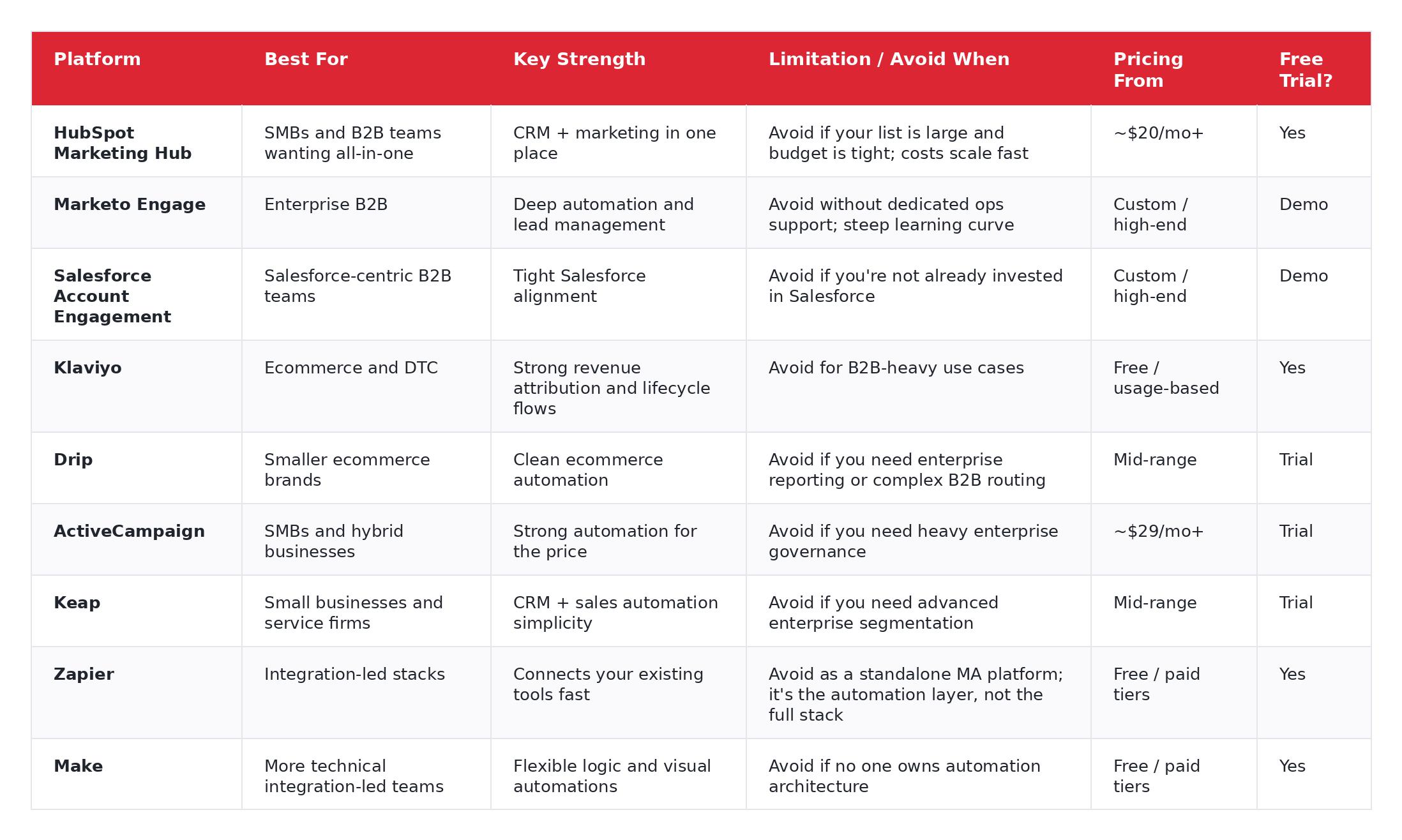
Selections based on direct implementation experience at Flow Digital, not affiliate relationships.
Not sure which category fits your business? Schedule a free discovery session.
What Is a Marketing Automation Solution?
A marketing automation solution is a combination of software, strategy, data, and integrations that automates repetitive marketing tasks across the customer lifecycle, from first touch to loyal customer.
That's the real definition. And the distinction matters more than most people think.
A tool is a marketing automation platform's feature set: email automation, lead scoring, segmentation, reporting. A solution is the tool plus the workflows, CRM structure, lead stages, tracking, suppression rules, reporting, and people decisions that make the tool useful. Most teams buy a tool and assume results follow. In real life, they don't.
We saw this firsthand with a mid-market SaaS client last year. They'd been on HubSpot for eighteen months, paying for Marketing Hub Pro, and their automation consisted of exactly one welcome email. The platform wasn't the problem. Nobody had built the system around it.
Think of it as a loop: Trigger → action → measurement.
A few simple examples:
- A prospect downloads a whitepaper, enters a nurture sequence, gets scored based on behavior, and is routed to sales when intent signals are high enough.
- A first-time ecommerce customer buys, receives an onboarding flow, then a review request, then a replenishment reminder 30 days later.
- A free-trial user activates one feature but ignores another, so the system sends education based on actual product usage, not a generic drip.
HubSpot defines marketing automation as software that automates repetitive tasks like email campaigns, social posting, and lead nurturing while helping businesses personalize at scale. That's accurate, but it's only half the story. The other half is implementation, and that's where most of the value (and most of the failure) actually lives.
If you already have tools in place but aren't seeing results, the gap is usually strategy and implementation, not the software itself.
What Marketing Automation Can Automate
Here's what marketing automation looks like when it leaves the slide deck and hits the real world.
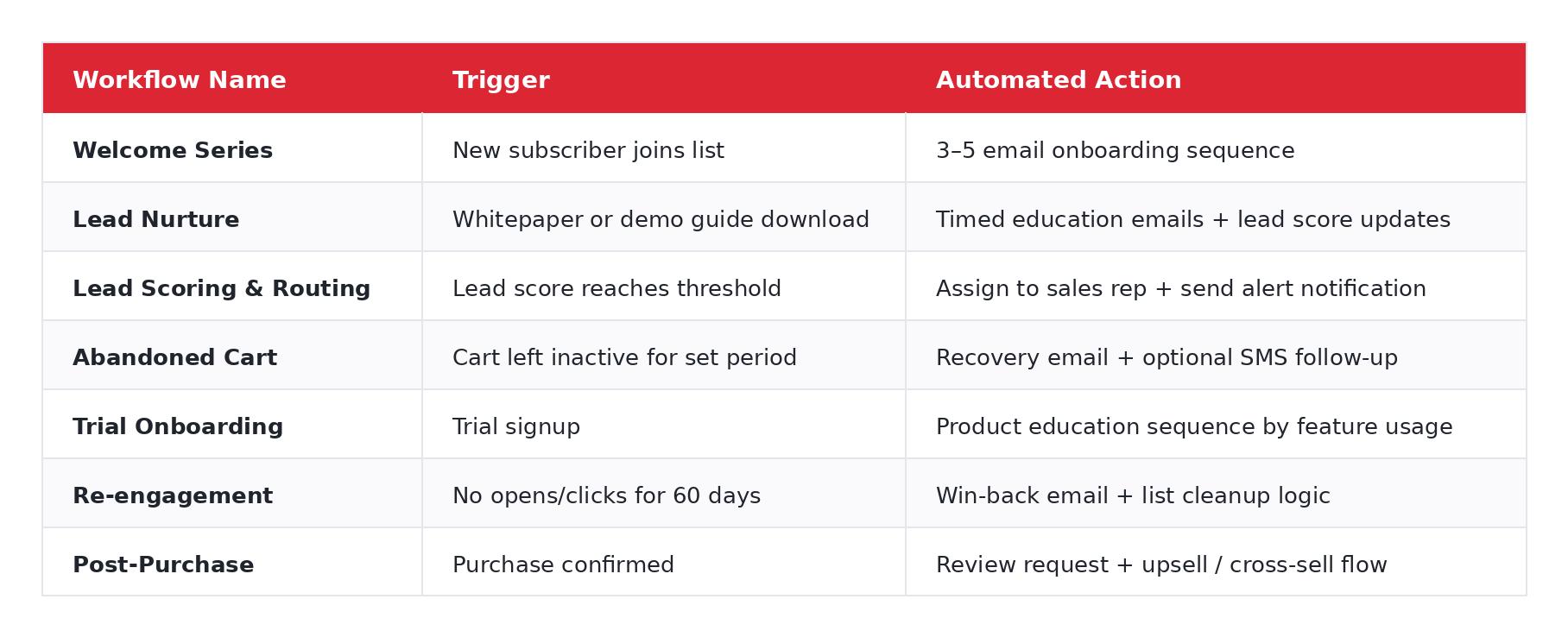
Most people miss this: automation isn't just "send email when X happens." The better use is coordination. Email, CRM updates, lead routing, internal notifications, suppression, attribution, all connected. A well-built abandoned cart flow, for instance, doesn't just fire an email. It checks whether the customer already purchased, suppresses if they did, alerts a sales rep if the cart value is above a threshold, and logs the whole interaction for attribution.
These are the exact workflow types Flow Digital builds for clients, from simple welcome sequences to complex multi-channel revenue pipelines.
Benefits of Marketing Automation
When it's set up properly, marketing automation gives you five practical wins. And yes, "set up properly" is doing a lot of work in that sentence.
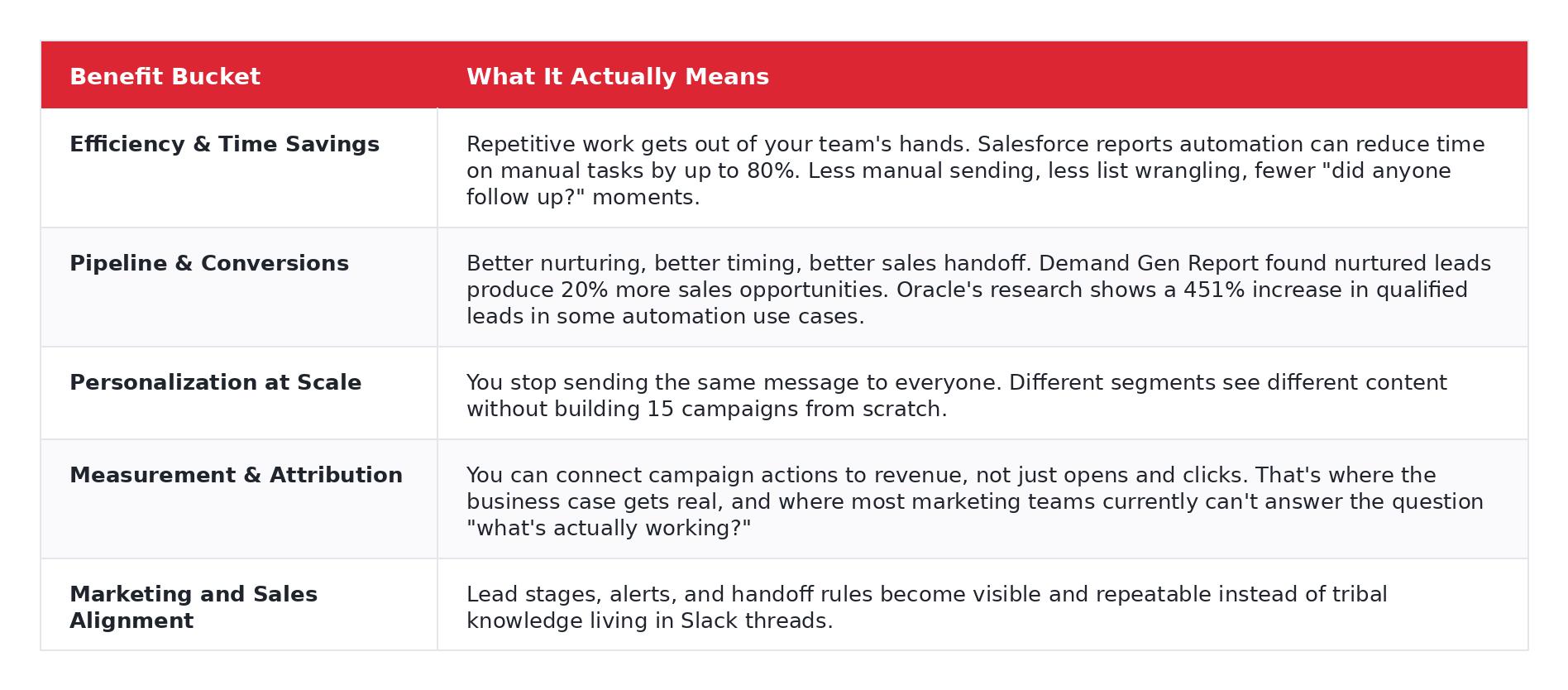
A quick example. One common B2B problem goes like this: marketing calls a lead "hot," sales ignores it, and everyone blames the channel. We've seen this pattern dozens of times. Usually the problem isn't the lead quality. It's the handoff criteria. Nobody agreed on what "sales-ready" actually means. Automation forces you to define that explicitly, in writing, inside the system. And once it's defined, it's repeatable.
Of course, these results assume the solution is set up correctly. The businesses that struggle with automation rarely have a tool problem; they have an implementation problem.
Types of Marketing Automation Solutions
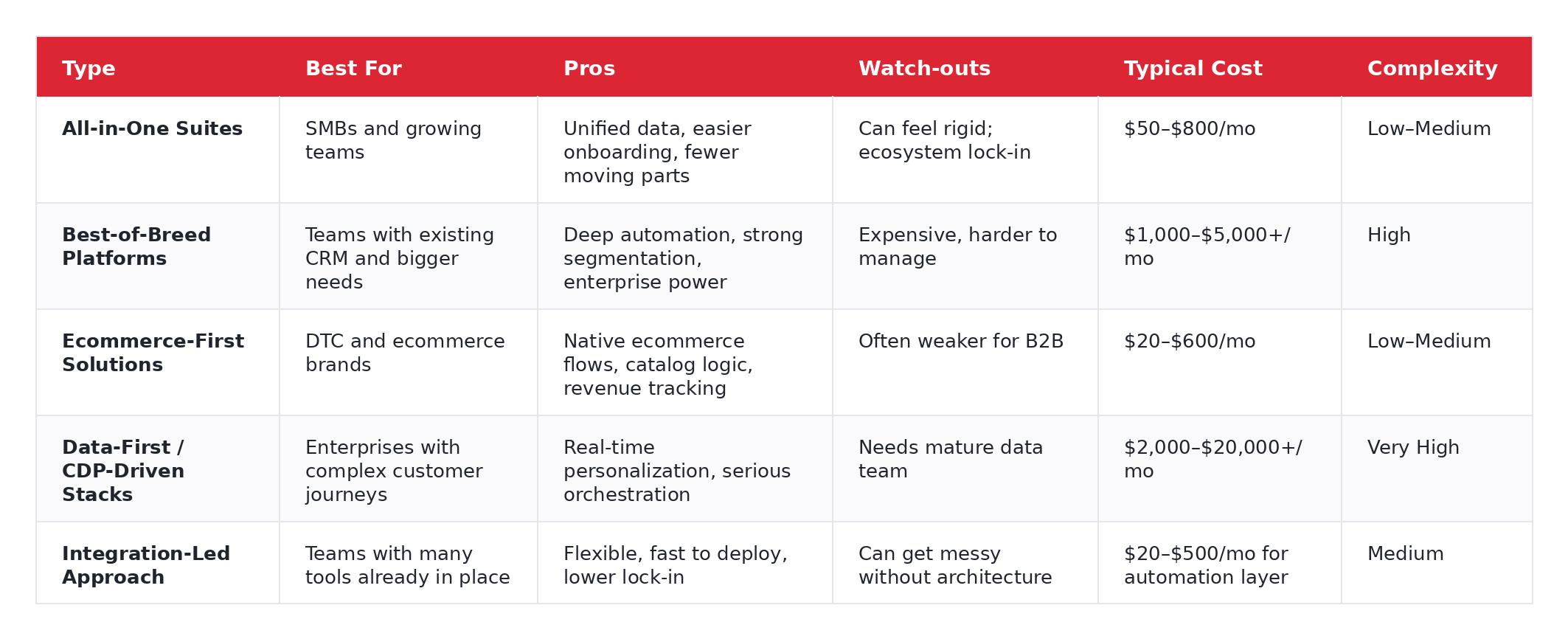
This is where the buying process usually gets clearer, or at least it should. Most guides skip this entirely and jump straight to tool reviews. But picking a platform before you know which type of solution you need is like buying furniture before you've seen the apartment.
B2B marketing automation solutions
For B2B, the conversation usually starts with pipeline visibility, lead scoring, CRM alignment, and lifecycle stages. HubSpot, Marketo, and Salesforce Account Engagement sit here most often. The key question is whether you need an all-in-one suite (simpler, tighter) or a best-of-breed stack (deeper, harder to manage).
Ecommerce marketing automation solutions
For ecommerce, it's more about purchase behavior, product catalog logic, replenishment timing, abandoned cart flows, and LTV segmentation. Klaviyo and Drip are the obvious names here. If you're a DTC brand doing $1M+ in revenue, you almost certainly need ecommerce-native automation that talks directly to your store, not a B2B tool bolted onto Shopify.
Omnichannel marketing automation solutions
This is where email alone stops being enough. Omnichannel means email, SMS, CRM updates, ad audiences, maybe web personalization, all triggered from one customer behavior stream. Most platforms claim to do this. In practice, only a few do it well without duct tape.
Integration-led solutions
This is the approach Flow Digital specializes in. As Zapier's #1 rated Premier Partner, the team designs and builds the automation layer that connects your existing tools into one working system instead of forcing a rip-and-replace. It's especially useful for teams who already have a CRM, an email tool, and a handful of other platforms they actually like. Here's how a Zapier consultant turns your sales process into a seamless workflow.
Not sure which model fits your business? Flow Digital has implemented across all five categories and can help you figure out the right one. Schedule a free discovery session.
AI-Powered Marketing Automation (What's Actually Useful in 2026)
Everyone says "AI" now. Most of the time, they mean a slightly smarter subject line generator. So let's keep this specific and skip the hype.
Predictive lead scoring
AI analyses historical conversion data to score leads based on behavioral signals: page visits, email engagement, time-on-site, firmographic fit. Instead of manually setting score thresholds, the system learns which patterns actually convert. Concrete example: a lead who visits your pricing page three times, opens four of five nurture emails, and matches your ICP firmographic profile gets auto-routed to sales with a high-priority alert, no human review needed.
Send-time optimization
The platform adjusts delivery timing per contact based on their historical engagement pattern, rather than blasting everyone at 10 a.m. on Tuesday. It's not glamorous. But one client saw a 15% lift in open rates just by letting the system pick delivery windows. Quietly useful.
Dynamic content
One email template, multiple content block variations served by audience segment. Your SaaS readers see a SaaS case study. Your ecommerce segment sees a revenue-lift stat. Same workflow, same send, smarter message. This is where personalization starts to feel real without building fifteen separate campaigns.
AI-assisted segmentation
Instead of manually building every audience rule, the system surfaces behavioral patterns and high-value cohorts you didn't know existed. In many cases, that helps you find revenue opportunities your team wouldn't have spotted manually, like a segment of users who always buy within 48 hours of viewing a specific product category.
Natural language content generation
Several platforms now offer AI-generated email copy, subject lines, and SMS messages inside the workflow builder. It's useful for first drafts and volume production. It is not useful as a replacement for human judgment on brand voice, accuracy, or compliance.
Guardrails: the part that actually matters
This section matters more than the five features above.
Brand voice risk: AI-written copy drifts. If nobody reviews output before it goes live, your brand starts sounding generic, or worse, wrong. Human review is not optional.
Compliance risk: Predictive personalization can create legal gray areas depending on how customer data is used, especially under GDPR and evolving AI regulations. "The algorithm did it" is not a compliance strategy.
Hallucination risk: AI-generated claims, product recommendations, and data points still need fact-checking. We've seen AI-powered email copy confidently cite product features that don't exist. Before you go live with any of this, test it.
Flow Digital's software setup and optimization engagements always assess whether your data model, consent records, and content governance are ready before activating any AI-powered automation features.
Must-Have Features Checklist
Before you compare marketing automation platforms, know what you're comparing. These are the marketing automation software features that separate a real solution from an expensive email tool.
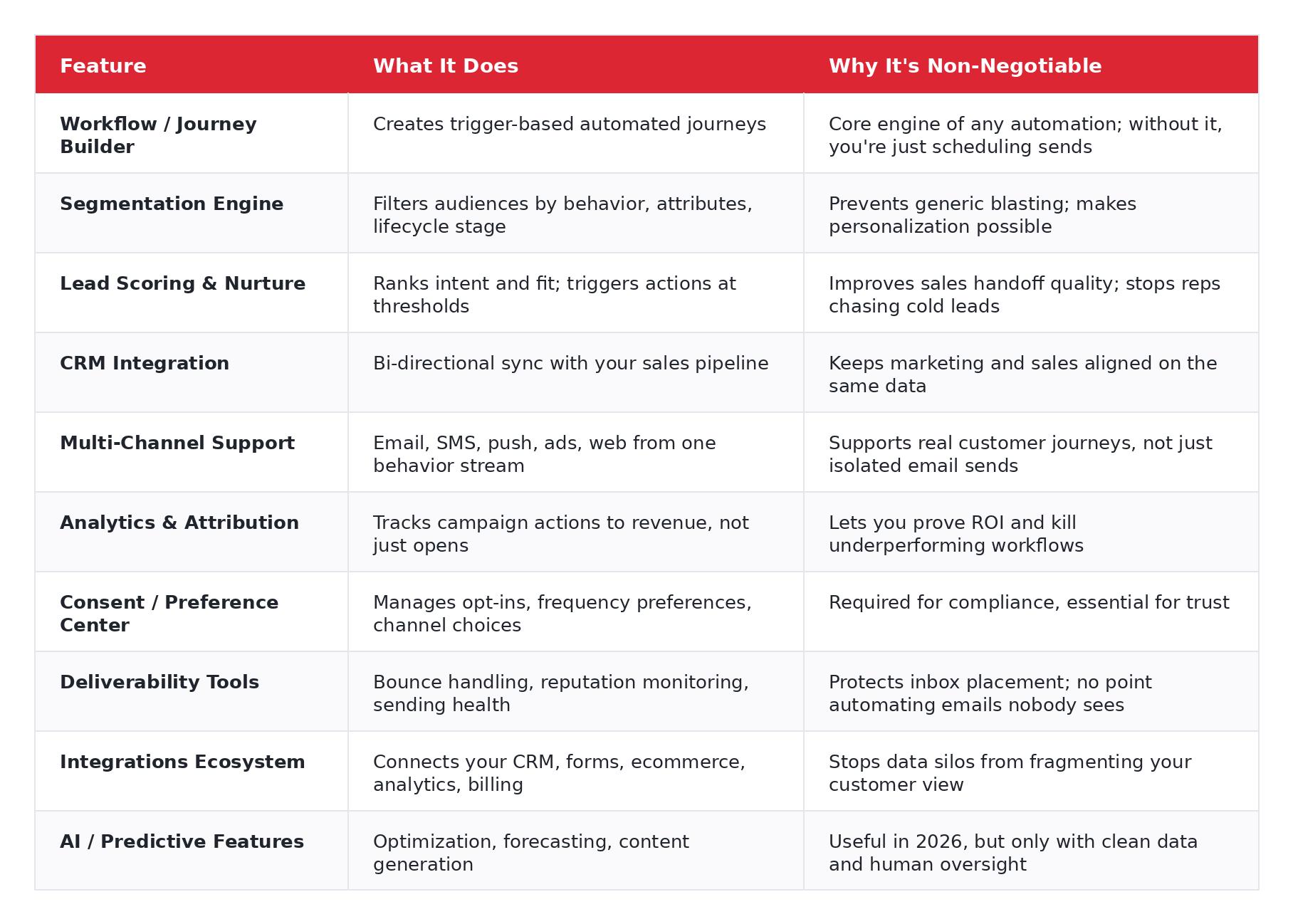
Not every marketing automation platform includes all of these well. Some are strong on workflow building but weak on attribution. Others nail CRM integration but lack multi-channel support. That's why the decision framework in the next section matters.
How to Choose the Right Marketing Automation Solution
This is where most buying processes go sideways. Teams compare feature lists and pricing pages when they should be answering a different set of questions first.
Before you pick a vendor, work through these:
1. What is your core use case? Lead nurture? Ecommerce lifecycle? Sales pipeline alignment? ABM? Start here, it eliminates half the platforms immediately.
2. What does your CRM look like today? Clean and usable, or a landfill with duplicate contacts, mystery custom fields, and three different definitions of "qualified lead"? Be honest. The answer changes your implementation timeline by weeks.
3. How technically capable is your team? Some marketing automation platforms are genuinely user-friendly. Others assume you have a dedicated ops person who thinks in API calls. If your marketing team can't build a workflow without engineering support, that's a real constraint.
4. What channels do you need? Email-only is a very different decision from email + SMS + ads + product-triggered messaging. Don't buy omnichannel capability you won't use for two years, but don't paint yourself into a corner either.
5. How mature is your data? Great automation on bad data just produces bad output faster. If your contact records are messy, your event tracking is incomplete, or your lead stages aren't defined, fix that first.
6. What is your real budget? License cost is one line item. Implementation, migration, data cleanup, training, and ongoing optimization count too. Many teams budget for the software and then scramble to find money for the work that makes the software useful.
7. Do you need multi-brand or multi-region support? That changes the stack fast. Some platforms handle this elegantly; others make it painful.
8. What must integrate with what? CRM, forms, ecommerce platform, analytics, billing system, support desk. Map the data flow before you evaluate a single tool.
Red flags when evaluating vendors
- Pricing stays vague until late in the sales cycle
- Weak native integration with your CRM
- Onboarding is basically "here's our help center, good luck"
- Contact-based pricing that punishes you for growth
- The demo looks impressive, but nobody can explain your specific use case clearly
If you'd rather skip the guesswork and get a recommendation based on your specific stack, team size, and goals, Flow Digital's consultants do this every day. We've helped hundreds of businesses select and set up the right software, and we can tell you in one call which platform fits. Schedule a free discovery session.
Selection Methodology
A quick note on how this shortlist was built, because methodology matters when you're making a purchasing decision based on someone else's recommendation.
Most "best marketing automation tools" pages are written by software vendors ranking their own product first, or by affiliate publishers ranking whichever platform pays the highest commission. You've probably noticed the pattern: the "best" tool always happens to be the one with the affiliate link at the top.
This guide is intentionally platform-agnostic. Flow Digital is a certified partner of HubSpot, ActiveCampaign, Zapier, Keap, and Pipedrive, but that partnership status doesn't determine ranking position. In fact, the shortlist includes several platforms we don't partner with at all, because they're the right fit for certain use cases.
The selection criteria, in order of weight:
- Use-case fit, does the platform actually solve the problem the buyer has?
- Integration flexibility, how well does it connect with CRM, ecommerce, analytics, and other tools?
- Workflow depth, can it handle real automation logic, or just simple if/then triggers?
- Scalability, does it grow with the business, or does pricing become punitive?
- Pricing logic, is the pricing model transparent and aligned with value?
- Honest watch-outs, every platform has weaknesses; hiding them helps nobody.
- Implementation reality, can a real team actually get this live and producing results?
That's the filter. No affiliate commissions. No vendor sponsorship. Just what we've seen work and not work across hundreds of implementations.
Marketing Automation Solutions: Full Reviews
For a fast side-by-side snapshot, see the comparison table at the top of this guide. Below is the deeper picture.
Best for B2B Pipeline
HubSpot Marketing Hub
Best for: SMB to mid-market B2B teams who want CRM and marketing in one place. Standout strength: The all-in-one experience is genuinely good, CRM, automation, reporting, and content tools in a single platform with decent usability. Onboarding is smoother than most competitors. Watch-out: Pricing escalates fast once you outgrow Starter. Contact limits and feature gating mean growing teams often face unexpected jumps. Budget carefully. Pricing model: Tiered plans, often contact-based. Free CRM entry, but meaningful automation starts at Professional tier.
If you're considering HubSpot, a HubSpot consultant can help you avoid the setup mistakes that lead to wasted spend.
Marketo Engage
Best for: Enterprise B2B with complex lead lifecycles and dedicated marketing ops. Standout strength: Powerful segmentation, deep lead lifecycle control, and mature enterprise-grade workflows. If you need sophisticated scoring models and multi-touch attribution, Marketo is built for it. Watch-out: It's not beginner-friendly. At all. Without a capable ops owner who lives in the platform, Marketo becomes very expensive shelfware. We've seen this happen more than once. Pricing model: Custom, enterprise-led. Expect a sales process.
Salesforce Account Engagement (formerly Pardot)
Best for: Teams already deep in the Salesforce ecosystem. Standout strength: The tightest alignment with Salesforce sales processes you'll find. If your sales team lives in Salesforce, the data handoff is seamless. Watch-out: Significantly less attractive if Salesforce isn't already central to your stack. The platform is powerful but can feel rigid outside its native ecosystem. Pricing model: Premium SaaS tiers tied to Salesforce licensing.
Best for Ecommerce Lifecycle
Klaviyo
Best for: Ecommerce and DTC brands serious about lifecycle revenue. Standout strength: Revenue attribution is best-in-class for ecommerce. Catalog-driven personalization, strong retention flows, and deep Shopify/WooCommerce integration. Watch-out: Usually not the right fit for B2B-heavy journeys. If your revenue model isn't product-purchase-driven, look elsewhere. Pricing model: Usage and contact-based. Free tier available for small lists.
Drip
Best for: Smaller or growing ecommerce brands who want clean automation without enterprise bloat. Standout strength: Solid lifecycle automation and ecommerce logic. Gets the job done without overwhelming you with features you'll never use. Watch-out: Not ideal for complex sales-team workflows or B2B routing. If you need enterprise reporting, you'll outgrow it. Pricing model: Contact-based.
Best for SMB / Getting Started
ActiveCampaign
Best for: SMBs, hybrid businesses, and service companies that need real automation depth without enterprise pricing. Standout strength: Genuinely impressive automation capability for the price. The workflow builder punches above its weight. Watch-out: Can get tangled fast if no one owns the naming conventions, folder structure, and suppression logic. Discipline matters here. Pricing model: Tiered monthly plans.
Keap
Best for: Small businesses and service firms that need simple CRM + sales automation in one place. Standout strength: Practical for service-business sales follow-up and basic lifecycle automation. Easier to learn than most competitors. Watch-out: Not built for complex enterprise scenarios. You'll hit the ceiling if your needs grow significantly. Pricing model: Tiered plans.
Best for Integration-Led Stacks
Zapier
Best for: Businesses with multiple existing tools that need an automation layer connecting everything. Standout strength: Fastest route to connecting apps and automating handoffs. Thousands of integrations, minimal technical skill required for basic automations. Watch-out: It is not a full marketing automation platform by itself. Think of it as the connective tissue, not the brain. Pricing model: Task-based tiers. Free plan available.
Make
Best for: More technical teams that need flexible automation logic and visual workflow design. Standout strength: Visual logic builder, branching, error handling, and more control than simpler connectors. Powerful when someone technical owns it. Watch-out: Easier to overbuild and under-document than almost any other tool in this list. If the person who built your Make scenarios leaves, you may have a problem. Pricing model: Operation-based tiers.
All platforms above are ones Flow Digital has implemented for real businesses. As certified partners of HubSpot, ActiveCampaign, Zapier, Keap, and Pipedrive, our recommendations come from implementation experience, not spec sheets. Explore our software-specific services or see our case studies.
0–90 Day Implementation Plan
This section exists in none of the top-ranking competitor pages. That tells you something about where most guides stop being useful.
Here's the practical rollout that actually works.
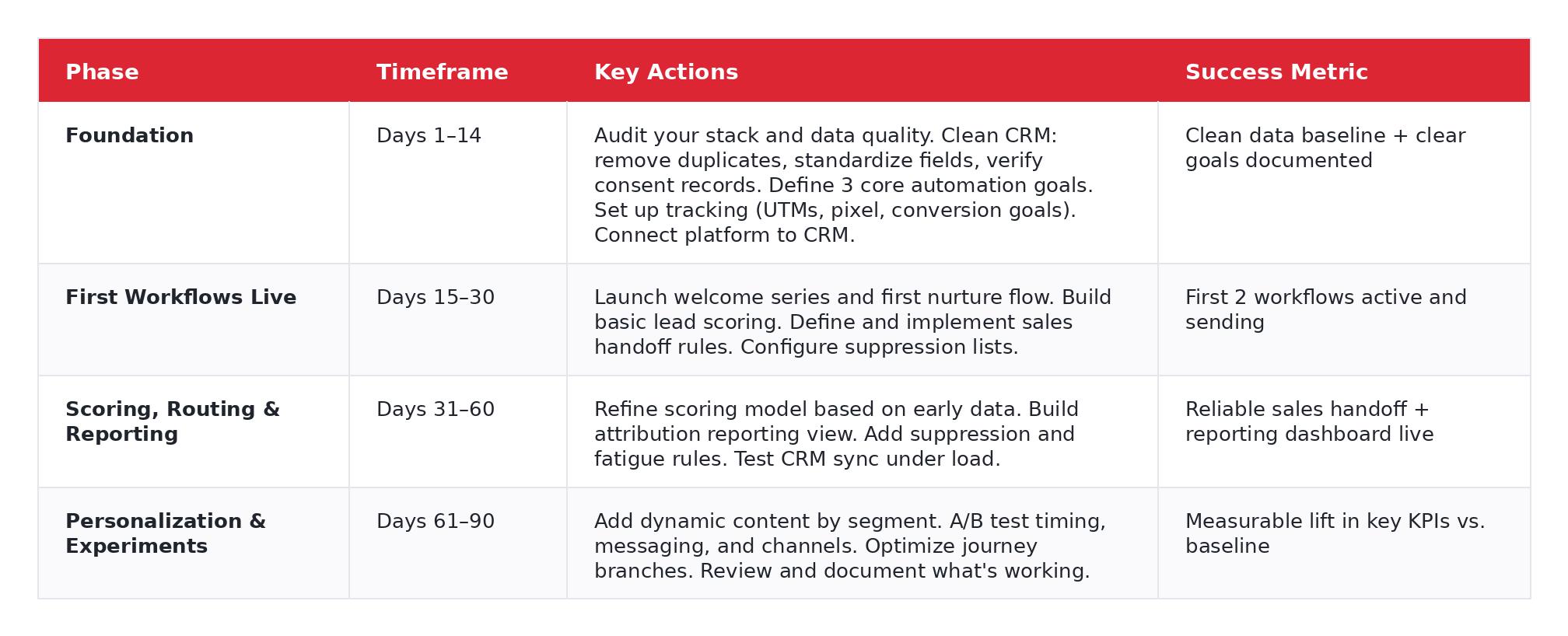
A tiny real-world note: week three is where most teams stall. Not because the software is bad, because the CRM fields aren't standardized, the forms aren't mapped correctly, or nobody decided what "sales-ready" actually means. We've seen a $200K/year Marketo implementation sit idle for six weeks because the sales team and marketing team couldn't agree on lead stage definitions. The software was fine. The people problem wasn't.
Steps 1–14 and the CRM integration in week three are where most DIY implementations stall. Bad data, misconfigured integrations, and missing suppression rules cause more automation failures than bad platform choices. Flow Digital's workflow automation service covers the full 0–90 day process, from initial stack audit to live optimized workflows, so your team doesn't lose momentum at week three. For teams that want ongoing support beyond the initial setup, our Fractional Chief Automation Officer service provides continuous optimization without hiring full-time.
Deliverability & Compliance: The Part Most Teams Skip
This section is boring right up until your domain reputation gets hammered and half your emails land in spam. Then it's the most important section in the article.
Email authentication
Google's sender requirements for Gmail now include SPF or DKIM for all senders, and SPF, DKIM, and DMARC for bulk senders (over 5,000 messages/day), alongside DNS alignment and spam-rate thresholds. If those basics aren't configured properly, and misconfiguration is more common than you'd think, deliverability suffers quietly. You won't know until open rates drop and nobody tells you why.
Consent and preference centers
Your automation platform should allow recipients to opt down, not just opt out. That means choosing frequency ("weekly" instead of "daily"), choosing channels ("email only, no SMS"), and choosing topics. Most platforms support this. Most implementations skip it.
Suppression lists
Unsubscribes, hard bounces, and complaints need to be suppressed globally, not campaign by campaign. This sounds obvious, but we've audited setups where unsubscribed contacts were still receiving automated sequences because suppression was applied only to manual sends.
List hygiene
Hard bounces should be removed immediately. Soft bounces need monitoring. And inactive contacts, the ones who haven't opened anything in six months, shouldn't sit there forever poisoning your engagement metrics and sender reputation.
Sending frequency and fatigue rules
One person should not end up in five overlapping workflows receiving a pile of messages in the same week. It happens far more often than teams admit. Fatigue rules and cross-workflow frequency caps are not optional, they're what separates automation from spam.
Deliverability and compliance setup is included in Flow Digital's software setup and optimization engagements: authentication configuration, suppression rules, and hygiene processes are part of every implementation, not an afterthought.
Why Most Automation Fails: The Integration and Data Problem
Marketing automation platforms are only as good as the data feeding them. This is the "real talk" section that most guides skip, and it's usually the reason implementations fail.
The CRM dependency
Every marketing automation platform requires a clean, structured CRM to function properly. If your CRM has duplicate contacts, missing lifecycle stages, inconsistent ownership rules, or custom fields nobody remembers creating, automation magnifies every one of those problems. Garbage in, faster garbage out. At scale.
We recently audited a company's HubSpot setup and found 40% of their contacts were duplicates. Their lead scoring was technically working, it was just scoring the same people twice and routing confused signals to sales. The fix wasn't a better scoring model. It was a CRM cleanup.
Event tracking
The strongest marketing automation workflows rely on behavioral data: pricing-page visits, feature usage, purchase timing, inactivity windows, return visits. Without event tracking piped into your automation platform, you're stuck building workflows on weak signals like email opens and link clicks. Those matter, but they're a fraction of the picture.
Integration architecture
Before you buy anything, map the flow:
- Where does lead data originate? (Forms, ads, product signups, referrals, events?)
- Where does it need to go? (CRM, automation platform, analytics, billing?)
- What behavioral events should trigger automation? (Page visits, purchases, trial actions, support tickets?)
- Who owns fixes when data breaks? (Because it will break.)
A pre-implementation data audit is the single most valuable thing you can do before choosing a marketing automation platform. Flow Digital's software optimization service typically includes this as a first step, and it regularly saves clients weeks of rework down the line. Here's a deeper look at how workflow experts help streamline business operations.
Who Marketing Automation Is NOT For
Not everyone needs a full marketing automation system. Honestly, that's fine, and telling you that is more useful than pretending everyone should buy something.
You probably don't need serious marketing automation yet if:
You only send a monthly newsletter. A full MA platform is overkill. Use Mailchimp's free tier or Brevo, save the budget for when you actually need automation logic.
You have fewer than 500 contacts and no sales process. There's nothing to automate yet. Focus on growing your list and defining your customer journey first.
Your CRM data is chaotic. Automating on top of messy data doesn't fix the mess, it scales it. Clean the CRM first. Then automate.
You expect automation to replace human relationship-building in B2B. It won't. Automation handles the repetitive middle. The high-value conversations still need people.
You can't clearly describe your customer journey yet. If you don't know the path from first touch to purchase, you can't automate it. Map the journey, then build the workflows.
If none of those describe you, you're probably ready. Here's how to get started.
Common Mistakes That Kill Marketing Automation ROI
These are the mistakes we see most often in audits, and none of them are about picking the wrong platform.
Automating before segmenting. One-size-fits-all automation is just spam with better timing. If you haven't segmented your audience by behavior, lifecycle stage, or use case, you're not ready to automate. You're just going to annoy everyone faster.
No suppression rules. Sending a "we miss you" re-engagement email to someone who purchased yesterday is a brand disaster. Every workflow needs suppression logic that checks against recent activity, recent purchases, and other active sequences.
Weak CRM handoff logic. Sales ignores "qualified" leads when the qualification logic is vague or when they've been burned by bad leads too many times. If your scoring model doesn't match what sales actually considers qualified, you've built a lead-generation machine that feeds directly into a recycling bin.
No measurement plan before launch. If you're defining success metrics in week eight, you're already behind. Set baseline KPIs before you launch a single workflow. Otherwise you'll have no idea whether automation is working or just running.
Over-emailing. Frequency caps are not optional. Your sender reputation, unsubscribe rate, and customer trust all depend on them. If one contact can end up in three overlapping sequences receiving five emails in a week and you don't have fatigue rules preventing that, it's a matter of time before deliverability takes a hit.
Choosing a platform before defining the use case. This is probably the most expensive mistake on the list. A team that buys Marketo for a simple newsletter and welcome sequence has wasted five figures. A team that buys a basic tool and then needs enterprise segmentation six months later has to migrate. Define the use case first. Always.
Most of these mistakes are invisible until they're expensive. An audit before you launch is almost always worth it.
Marketing Automation Pricing: What to Expect
Vendors price by contacts, seats, or features. Ranges below are directional only. Always confirm current pricing directly on the vendor's website or via a live quote before making any budget decisions.
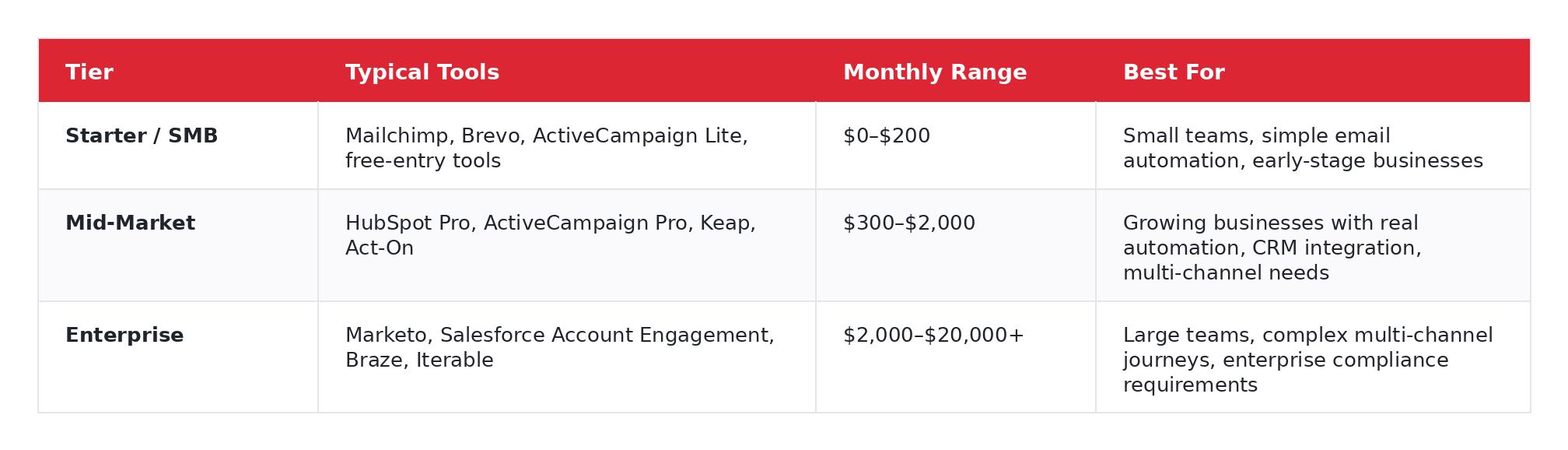
And here's the part vendors gloss over: software license is only one part of total cost. Implementation, data cleanup, migration, training, and ongoing optimization can easily add another 20–50% to the real first-year spend. The $800/month platform that needs $15,000 in setup work is a different conversation from the $400/month platform you can get live in two weeks.
Flow Digital’s pricing is structured around sessions, hourly retainers, and ongoing Fractional CAO support, so you can match the engagement model to your actual needs instead of paying for a monolithic implementation contract.
Frequently Asked Questions
What are marketing automation solutions?
Marketing automation solutions are systems that combine software, workflows, data, integrations, and measurement to automate repetitive marketing tasks across the customer lifecycle. Unlike standalone tools, a solution includes the strategy, CRM structure, and governance that make the platform effective.
What's the difference between marketing automation software and a solution?
Software is the platform (the features, the interface, the automation builder). A solution is the platform plus the strategy, CRM data model, integrations, reporting, suppression rules, and operational governance that make it produce results. Most implementation failures happen because teams buy software and treat it as a complete solution.
How much do marketing automation solutions cost?
Anything from free entry-level tools to enterprise platforms costing $20,000+ per month. The real answer depends on your use case, contact volume, channel requirements, and implementation complexity. Budget for the platform and the implementation work, not just the subscription line item.
How long does implementation take?
Simple first workflows (welcome series, basic nurture) can go live in 2–4 weeks. A properly configured and optimized system, with CRM integration, lead scoring, attribution, and multi-channel workflows, typically takes 60–90 days. Teams that skip the foundation phase usually end up rebuilding later.
What is the best marketing automation solution for B2B?
It depends on your stack and team. HubSpot is often the best fit for SMB-to-midmarket teams wanting all-in-one simplicity. Marketo is the enterprise choice for deep lead lifecycle control. Salesforce Account Engagement is the natural pick for teams already invested heavily in Salesforce. There's no universal "best." There's best for your situation.
What is the best marketing automation solution for ecommerce?
Klaviyo is the default recommendation for ecommerce-first lifecycle marketing: strong revenue attribution, catalog-driven personalization, and deep Shopify integration. Drip is solid for smaller ecommerce brands. Hybrid businesses (B2B + ecommerce) may prefer ActiveCampaign for its flexibility.
Do I need a consultant to implement marketing automation?
Not always. Simple single-channel setups, a welcome email sequence, a basic newsletter automation, can often be self-implemented using platform tutorials. However, if you're integrating with a CRM, migrating from another platform, or building multi-channel workflows, expert implementation typically saves weeks of troubleshooting and prevents costly data mistakes. That's exactly the kind of work Flow Digital handles, from platform selection and software setup through to live, optimized workflow automation. With 500+ five-star reviews across partner directories, our team has seen what works and what doesn't across hundreds of real implementations.
What is omnichannel marketing automation?
It's automation that coordinates messaging across email, SMS, ads, push notifications, and sometimes on-site personalization, all triggered by one unified customer behavior stream. The key word is coordinated: the customer sees a connected experience, not disconnected blasts from separate channels.
Conclusion
Marketing automation solutions are not just tools, they're systems. That's the core takeaway from everything above.
The right platform depends on your use case, your existing stack, your data quality, and your team's ability to operate and maintain it. And most implementation failures are preventable, but only if you stop treating software selection as the entire project and start investing in the strategy, data, and integration work that makes the platform useful.
If you're ready to stop researching and start building, Flow Digital's team of certified automation consultants will assess your current stack, recommend the right-fit platform for your goals, and implement it so it actually works. With certified partnerships across HubSpot, Zapier, Pipedrive, ActiveCampaign, and Keap, we match the platform to the problem, not the other way around.
Nathan Weill
Certified Zapier expert, premier Pipedrive partner and self-professed tech geek. Nathan has over a decade of experience helping hundreds of companies optimize their workflows, streamline processes and eliminate time-consuming tasks. Founder of Flow Digital, Nathan enjoys harnessing the power of automation to save businesses time and money.


Let's make your workflow woes a distant memory.