The AI Use Gap: What Businesses Ask For vs. What Gets Built
By Nathan Weill · September 17, 2026

What six months of sales and client calls reveal about AI demand, production, and practical value.
AI came up in almost half of our client conversations.
But only 20% of organizations independently asked us to build something with it.
Of those requests, 22% became a live implementation or an active build.
Here is the part we did not expect: 47% of the AI solutions we delivered were for clients who didn't initially realize AI was the best answer to their problem but eagerly adopted it once we showed them the impact.
Those percentages tell a more nuanced story than a simple AI adoption rate.
Businesses tend to ask for the AI they can see: assistants, agents, chatbots, voice systems, and other tools that look impressive in a demo.
The AI that actually makes it into production is usually quieter.
It reads an email. Extracts information from a document. Classifies a request. Cleans up data. Adds context to a CRM record. Then it hands the work back to a reliable automation, a business system, or a human.
That gap between the AI businesses request and the AI they eventually use is what we call the AI use gap.
The goal is not to add as much AI as possible. The goal is to build the most reliable workflow possible, using AI only where it improves the result.
The results at a glance
These findings come from six months of client conversations and implementation work across hundreds of organizations.
AI came up in 49% of client conversations
AI was part of nearly half of our client conversations, but that does not mean half of our clients were asking us to implement it.
That figure includes conversations where our team introduced AI, AI tools were mentioned in passing, or the client was already using systems with AI capabilities.
20% of clients independently asked us to implement AI
When we narrowed the data to clients who independently raised a specific AI use case and asked Flow Digital to help implement it, the number dropped to 20%.
In other words, AI came up frequently, but only one in five clients specifically asked us to build something with it.
22% of those AI requests progressed to implementation
Of the clients who specifically requested AI, 18% had an AI solution built and deployed, while another 4% had one actively being built.
Combined, 22% of requested AI use cases had progressed to implementation. The remaining 78% had not progressed to a build.
That should not automatically be viewed as a failure. An AI request does not necessarily mean AI will be the right solution once we understand the workflow, requirements, and constraints.
47% of the AI we deployed was not originally requested
This is where the pattern becomes particularly interesting.
Nearly half of the AI components we put into production were built for clients who had not originally asked us for AI.
Instead, the opportunity emerged as we worked through the underlying business process.
Clients might come to us because their team spends too much time reading emails, extracting information from documents, categorizing requests, cleaning up records, or handling exceptions. Those are operational problems. Once we understand the workflow, AI may turn out to be part of the solution.
Because we work with clients from workflow discovery through implementation, we get to see both sides: what clients initially ask for and what ultimately gets built.
The pattern we observed was clear:
The AI clients initially ask for is not always the AI that ultimately gets implemented.
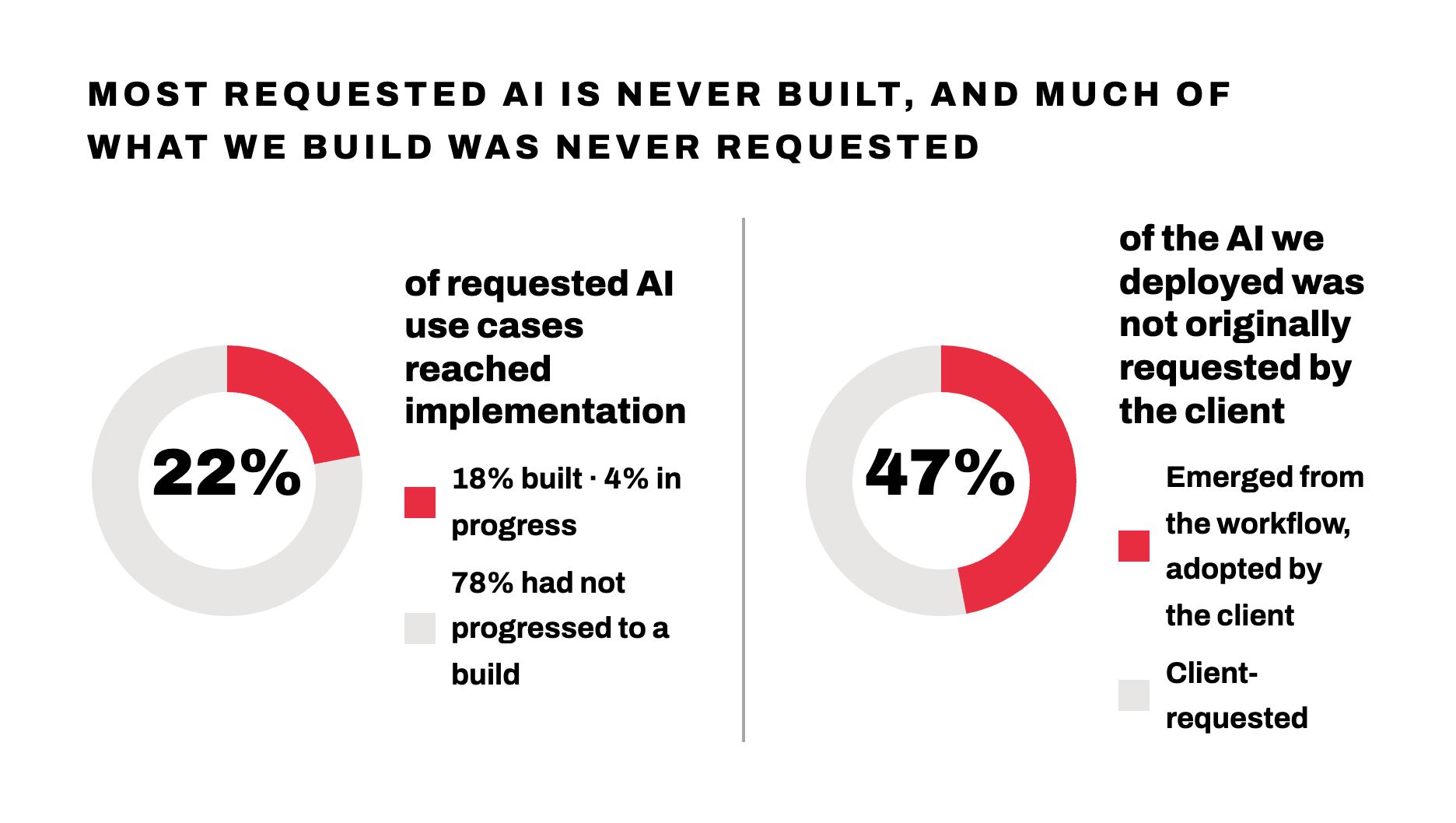
Nearly half the AI we delivered was invisible at the start
The most surprising result was not that many AI ideas stayed on the drawing board.
It was that 47% of live AI implementations came from somewhere else entirely.
The clients had not asked for AI. In many cases, they had not described the problem as an AI problem.
They described something like this:
- Our team spends too long reading incoming emails.
- We need information copied from documents into our CRM.
- Every submission arrives in a slightly different format.
- Someone has to categorize each request manually.
- Our records are missing useful context.
- Employees keep reformatting the same information.
- We need to identify exceptions before they cause delays.
Those are operational problems.
Once the workflow is mapped, part of the solution may involve AI. But AI is rarely the entire solution.
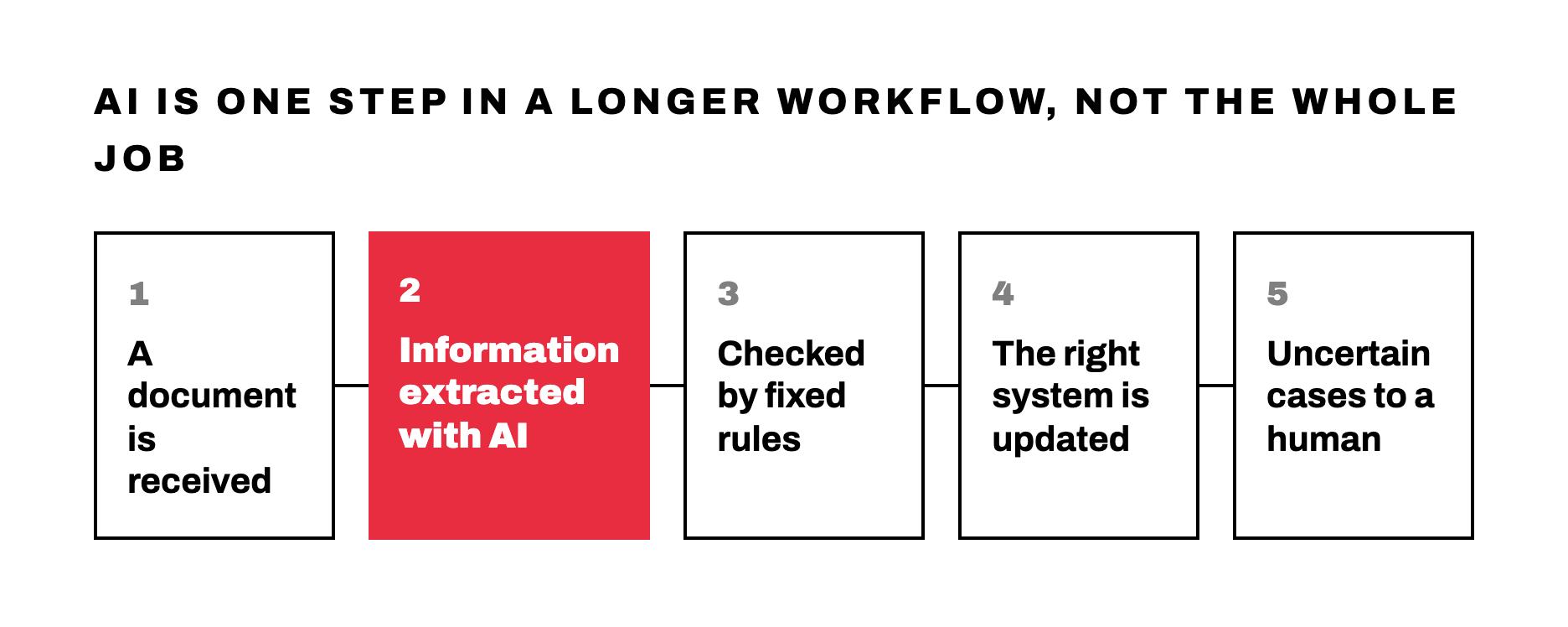
A document-processing workflow, for example, might look like this:
Document received → information extracted with AI → data checked using fixed rules → record updated → uncertain cases sent for human review
The person using that system may simply see a completed CRM record.
They may not know that AI read the document. They may not care.
And honestly, they should not have to.
The best technology often disappears into the process.
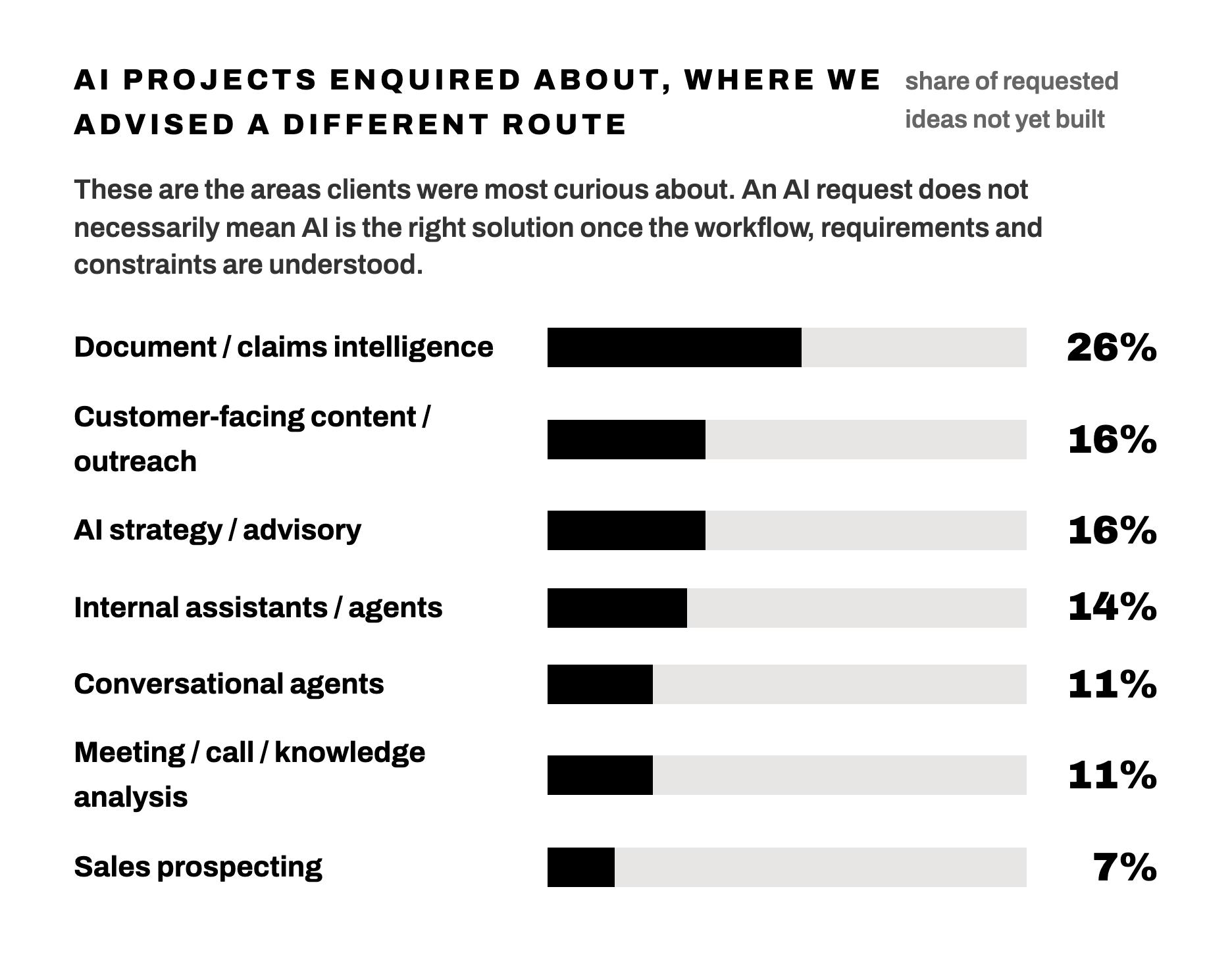
Businesses ask for visible AI
When organizations independently asked us about AI, many of their ideas focused on visible, recognizable AI products.
Among requested ideas that had not yet become builds:
- 26% involved document or claims intelligence
- 16% involved customer-facing content or outreach
- 16% involved AI strategy or advisory work
- 14% involved internal assistants or agentic systems
- 11% involved conversational agents
- 11% involved meeting, call, or knowledge analysis
- 7% involved AI-powered sales prospecting
There is nothing inherently wrong with these ideas.
But the more open-ended and customer-facing the system becomes, the more difficult it is to make reliable.
A customer-facing agent needs to handle unpredictable questions, missing information, unusual requests, changing policies, and frustrated people. It also needs to know when to stop and involve a human.
An internal assistant may need access to documents scattered across multiple systems, each with different permissions, formats, and levels of accuracy.
A voice agent needs to understand speech, maintain context, take the correct action, and recover gracefully when something goes wrong.
The impressive demo is usually the easy part.
The real work is everything around it:
- Connecting the correct data
- Defining permissions
- Testing edge cases
- Managing exceptions
- Preventing unsupported answers
- Escalating to humans
- Tracking errors
- Measuring whether the system is actually better
That is where many exciting ideas become complicated projects.
What reaches production is usually quieter
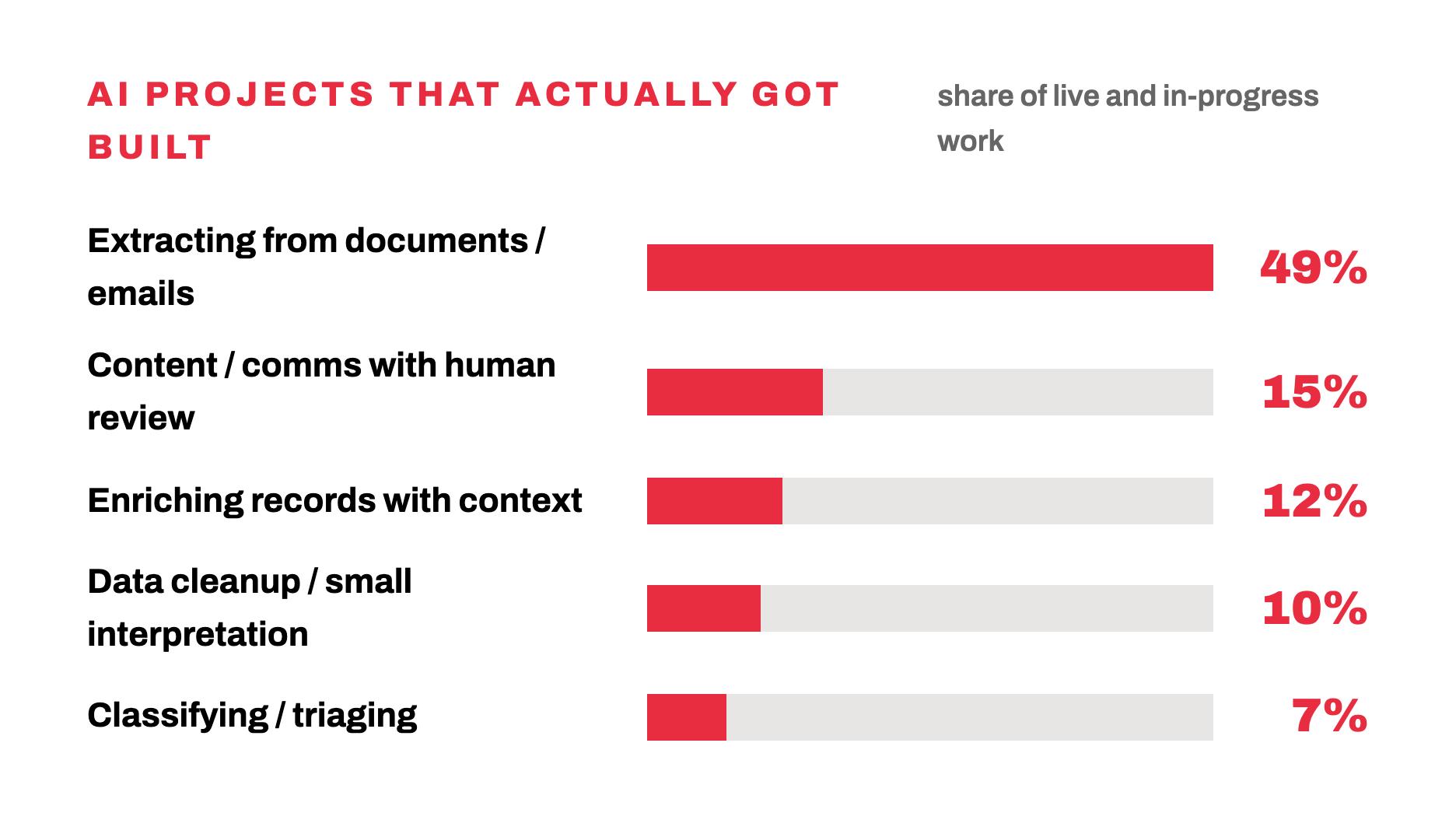
The AI components we delivered looked different from many of the requests we received.
Among live and in-progress implementations:
- 49% focused on extracting information from documents or emails
- 15% supported content or communication with human review
- 12% enriched existing records with additional context
- 10% handled data cleanup or small interpretation steps
- 7% classified or triaged incoming information
Voice systems and standalone assistants represented only a small percentage of delivered work.
The pattern was clear.
AI reached production most often when it had:
- A narrow responsibility
- A recognizable input
- A defined output
- A clear place in an existing process
- A human review path
- A measurable operational purpose
This does not mean customer-facing AI cannot work.
It means a focused document-extraction step is easier to evaluate than an assistant expected to answer almost anything.
You can test whether the extraction captured the correct invoice number.
It is much harder to define whether an open-ended assistant gave the “right” answer across every possible conversation.
Most of the AI was a step inside an automation
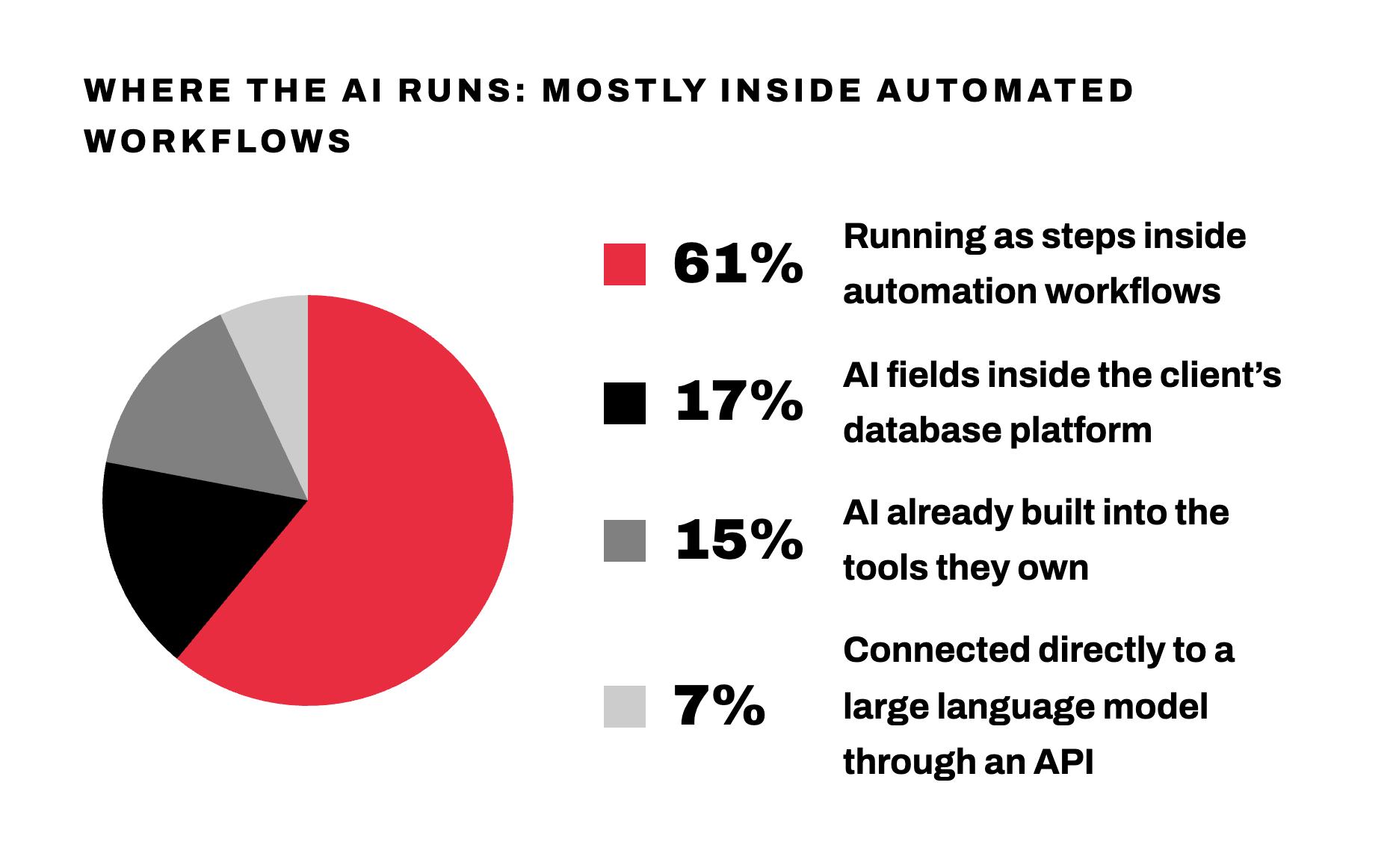
Another finding helps explain why clients may not recognize that they are using AI.
Of the AI components we built or were actively implementing:
- 61% operated as steps inside Zapier workflows
- 17% used Airtable AI fields
- 15% used AI capabilities built into other platforms
- 7% connected directly to a large language model through an API
In other words, most of the AI did not exist as a separate AI product.
It existed inside the tools and processes the client already used.
The AI might read text, identify a category, extract a few fields, or draft a response. A conventional automation would then validate the output, update the right system, trigger the next action, and notify the appropriate person.
This is what practical AI implementation often looks like.
Not:
AI does everything.
But:
AI handles the uncertain part. Automation handles the predictable part. Humans handle the exceptions.
AI is good at ambiguity. Automation is good at certainty.
AI and automation are often grouped together, but they solve different kinds of problems.
Traditional automation works best when the rules are clear.
For example:
- When a deal enters a specific stage, create a task.
- When an invoice is overdue, send a reminder.
- When a form is submitted, update the CRM.
- When a value exceeds a threshold, request approval.
- When two fields match, connect the records.
These processes should behave consistently. The same input should produce the same result every time.
AI automation is useful when the input is less predictable.
For example:
- Extract information from emails written in different ways
- Read documents with inconsistent layouts
- Categorize free-text requests
- Summarize long conversations
- Identify meaning from unstructured notes
- Draft content based on context
- Determine whether a message requires urgent attention
The strongest workflows often combine the two.
AI interprets the messy information. Automation takes reliable action.
Problems begin when AI is asked to handle work that should be deterministic.
You do not need a language model to perform an exact calculation, compare two stable fields, or follow a rule that can be written clearly.
Adding AI to those steps can make the process more expensive, more difficult to audit, and less reliable.
Sometimes, the most valuable thing an AI consultant can say is:
You do not need AI for this.
We removed AI when simpler technology worked better
During the period we analyzed, we documented multiple cases where an AI idea was intentionally removed, postponed, or replaced.
In one case, an AI-based matching step was replaced with conventional code.
The matching criteria were stable and structured. A deterministic solution could produce the same result every time, while also being easier to test, explain, and maintain.
In another case, AI was being used for a calculation. It failed during testing and was removed from the workflow.
The problem did not need better prompting. It needed a formula.
These decisions can look like setbacks if success is measured by how much AI gets included.
We measure success differently.
The question is not:
Did we manage to use AI?
The question is:
Did we build the most reliable, efficient, and maintainable solution?
Removing unnecessary AI is not a failure of implementation.
Sometimes, it is the implementation expertise.
“AI adoption” can mean almost anything
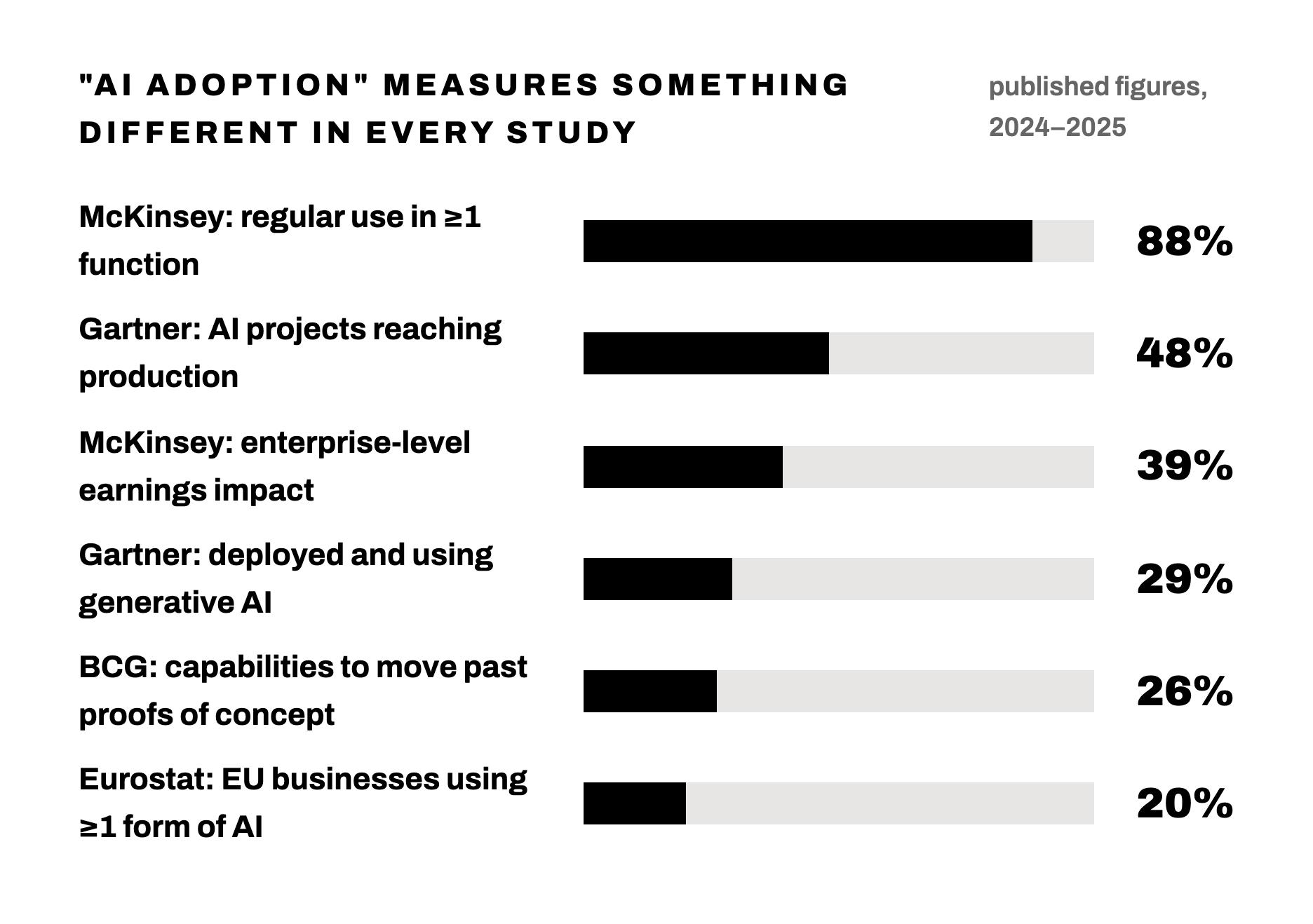
Our findings also highlight a problem with many AI adoption statistics.
Depending on the study, AI adoption may mean:
- An employee uses a generative AI tool
- A department is testing a pilot
- A company pays for software with an AI feature
- An AI component is running in a production workflow
- AI has been scaled across multiple departments
- The organization can measure a financial result
These are very different levels of adoption.
In 2025, Eurostat reported that 20% of eligible EU businesses used at least one form of AI. Text analysis was the most common business use.
McKinsey’s 2025 survey found that 88% of respondents said their organizations regularly used AI in at least one business function. But nearly two-thirds had not started scaling it across the enterprise, and only 39% reported an enterprise-level impact on earnings.
Gartner reported that 29% of surveyed organizations had deployed and were using generative AI. It also found that an average of 48% of AI projects reached production. The most common delivery method was AI embedded inside existing applications.
BCG found that only 26% of companies had developed the capabilities needed to move beyond proofs of concept and generate tangible value.
These results are not necessarily contradictory.
They are measuring different points in the journey.
A business can use AI without having scaled it.
It can run a pilot without having a production workflow.
It can have a production workflow without employees thinking of it as AI.
It can deploy AI without generating measurable value.
A single adoption percentage cannot explain all of that.
Embedded AI may be underreported
There is another reason adoption surveys can be difficult to interpret.
Some companies may report that they use AI simply because employees use ChatGPT or another visible generative AI tool.
Others may report that they do not use AI even though an AI component is operating inside a CRM, automation platform, document-processing system, or other application.
Our data suggests that this second group may be more common than people realize.
When 47% of our live AI implementations were delivered to clients who had not requested AI, it raised an obvious question:
Would every one of those clients describe themselves as an AI adopter?
Possibly not.
They might say they automated document intake.
They might say they improved their CRM.
They might say they eliminated manual data entry.
They might not know, or care, that an AI model performs one step in the process.
That does not make the AI less real.
It makes the label less important than the outcome.
The AI people want is not always the AI their business needs
AI is unusually vulnerable to solution-first thinking.
Someone sees an agent demo and asks, “Where can we use this?”
An executive makes AI a strategic priority.
A competitor launches an assistant.
A vendor adds an AI button to its product.
Technology becomes the starting point.
But strong implementation should start somewhere else:
- What is slowing the process down?
- Which inputs are structured, and which are not?
- Which decisions follow stable rules?
- Where does human judgment add value?
- What would happen if the system made a mistake?
- How will we measure whether the new workflow is better?
Only then should the technology be selected.
Sometimes the answer will be AI.
Sometimes it will be a Zap, formula, script, database change, software configuration, or better process.
Usually, it will be a combination.
What business leaders should take from this
The practical lesson is not to avoid AI.
It is to be more selective about where you use it.
Start with the bottleneck
Do not begin with, “We need an AI agent.”
Begin with, “This part of the process is slow, inconsistent, or expensive.”
The second statement gives you something measurable to improve.
Fix the process before automating it
AI cannot rescue a workflow that nobody understands.
If the team follows different rules, stores information inconsistently, or cannot agree on the desired outcome, adding AI will automate the confusion.
Use AI for interpretation, not everything
AI is strongest where language, documents, context, or variation make fixed rules difficult.
Once the uncertain information has been interpreted, pass it to a deterministic system whenever possible.
Design for exceptions
Do not judge a workflow only by what happens when everything goes right.
Define what happens when:
- Information is missing
- Confidence is low
- Two sources conflict
- A customer asks something unexpected
- A document cannot be read
- The requested action carries financial, legal, or reputational risk
The exception path is part of the product.
Keep humans where judgment matters
Human review does not make an AI implementation less advanced.
It can make it more useful.
A system that handles most routine cases and sends uncertain ones to the right person may deliver more value than one that attempts full autonomy and makes costly mistakes.
Measure the workflow, not the novelty
The most important metrics are usually familiar business metrics:
- Processing time
- Error rate
- Manual effort
- Cost per transaction
- Response time
- Conversion rate
- Rework
- Customer satisfaction
- Revenue
- Time to resolution
“Uses AI” is not a business outcome.
The real AI opportunity is inside the workflow
Our research started with a straightforward question:
What are businesses asking us to build with AI?
It led to a more useful one:
Where is AI actually earning its place in the workflow?
The answer was rarely the most visible or dramatic use case.
It was usually one focused step:
- Reading
- Extracting
- Classifying
- Enriching
- Summarizing
- Drafting
- Flagging
That step was then surrounded by reliable automation, clear business rules, connected systems, and human oversight.
Businesses often ask for the AI they can see.
The AI that reaches production is usually quieter, narrower, and embedded inside a well-designed process.
That is not less ambitious.
It is how useful technology becomes part of the way a business actually works.
Ready to find where AI belongs in your workflow?
Flow Digital maps your processes, flags where AI actually earns its place, and builds the automation around it, so you get a system that works instead of a demo that fades after a few weeks.
About the research (Limitations and disclosures)
This article is based on Flow Digital’s analysis of recorded sales and client-call transcripts from a six-month period running from early 2026 through mid-2026.
The sample included hundreds of organizations across several industries.
Percentages in this article are rounded to the nearest whole percentage point.
Unless otherwise noted, findings are measured at the organization level rather than the call level.
The sample is not a random or representative sample of all businesses. Organizations speaking with an automation consultancy may be more interested in process improvement, software, and AI than the broader business population.
A live AI component is not automatically a successful or profitable one. This analysis measures implementation status, not return on investment.
Transcript classifications were reviewed for consistency, but the research was not independently audited.

Nathan Weill
Certified Zapier expert, premier Pipedrive partner and self-professed tech geek. Nathan has over a decade of experience helping hundreds of companies optimize their workflows, streamline processes and eliminate time-consuming tasks. Founder of Flow Digital, Nathan enjoys harnessing the power of automation to save businesses time and money.


Let's make your workflow woes a distant memory.