What Are the 4 Types of CRM and How to Choose the Right One
By Nathan Weill · May 22, 2026

In the early stages of running a business, management of clients can be as simple as notetaking on a spreadsheet or a post-it note or, at most, relying on memory. However, there comes a point where this management “system” becomes more problematic. Things that were once easily remembered begin to slip through the cracks. You forget who you promised what deal to, who you were going to follow up with, or worse, you and your coworkers are spending so much time sorting and rediscussing things that you forget that your actual work is to speak with people.
This is a phase of development that every company has to face at some point. You will realize that you need a proper Customer Relationship Management (CRM) system, but the state of the market is full of a jumble of acronyms and promises of intricate systems that claim to do everything. The different types of CRM systems you search for now are methods to help you reclaim your time, as well as the ability to scale your comfort among your clients. This will articulate the four elements in CRM structure, provide you with some practical examples, and help you choose the best one to manage the business practice you brought into the world.
What Are CRM Systems?
At its simplest, a CRM is a digital hub where every interaction, from a first-time website visit to a 5-year-anniversary support ticket, is recorded and organized.
But the meaning of CRM systems has evolved in 2026. It’s no longer just a digital Rolodex. Modern platforms are now living ecosystems that use AI to predict when a customer might churn, automate the "boring stuff", like data entry, and ensure that your marketing and sales teams are actually singing from the same songbook.
A solid CRM helps you:
- Centralize Data: No more "where did I save that phone number?"
- Visualize the Pipeline: See exactly how many deals are close to signing.
- Personalize at Scale: Treat 1,000 customers like you only have ten.
- Boost Internal Collaboration: Stop the "he-said, she-said" between departments.
Why Understanding the Types of CRM Matters
Not knowing which kind of CRM you need is like buying a car designed for a street race without knowing you want to haul timber. A vehicle designed for an entirely different job can have an engine with more horsepower than required, but it can still be a worse choice than the car designed to do the job you want to do.
Choosing the wrong type means your purchase becomes “Shelfware,” and the software you bought is so expensive it’s actually a huge waste because no one likes it and no one uses it to do any work. A data scientist will complain that an operational CRM is too broad for his liking, while a sales team will despise a CRM that’s designed to focus on operations and is unnecessarily complicated.
The 4 Types of CRM Systems
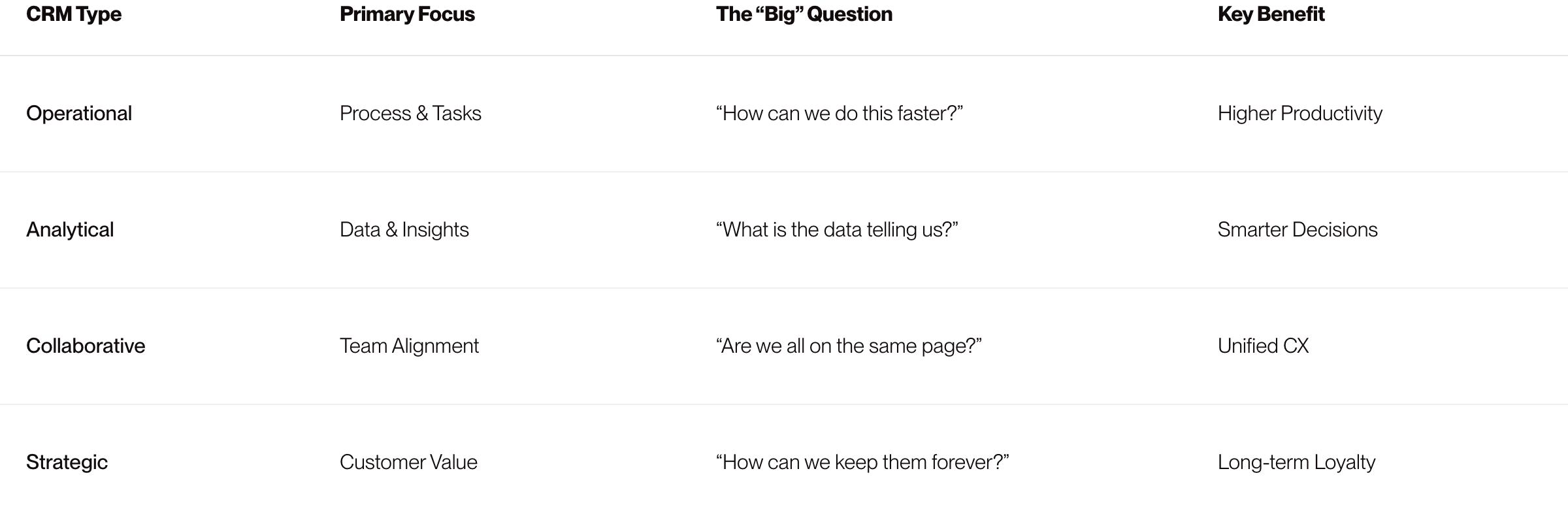
To choose correctly, you need to understand the four primary categories: Operational, Analytical, Collaborative, and Strategic.
1. Operational CRM
Operational CRM is the most popular category for a reason: it’s the "doer." It focuses on streamlining the day-to-day, customer-facing processes that keep the lights on. If you want to automate your workflow, i.e., sales, marketing, and service, this is your home.
Main Functions
- Sales Force Automation: These are all the non-customer-facing parts of the sales cycle. They automate things like placing sales offers, giving alerts to customers, and monitor to whom sales were made.
- Marketing Automation: These CRMs do a lot of work related to marketing, i.e. campaigns, lead management, and advertisements that have sales.
- Service Automation: Customer service portals, automatic FAQs, and many other self-supporting and self-servicing non-customer-facing fronts to customer-service portals are all managed by these CRMs, so the customer service team can avoid burning out.
The "Human" Perspective
Imagine your best salesperson, Sarah. Without an Operational CRM, Sarah spends 40% of her day logging calls and manually emailing leads. With it, the CRM "logs" the call for her, automatically sends a "nice meeting you" email, and pings her in three days to follow up. Sarah gets her time back to do what she does best: close deals.
- Best For: Sales-heavy startups, SMEs, and companies with high-volume customer interactions.
- Popular Examples: HubSpot, Jotform, Pipedrive, Zapier.
2. Analytical CRM
While Operational CRM is about doing, Analytical CRM is about learning. These systems sit behind the scenes, crunching the massive amounts of data you collect to find patterns that a human might miss.
Main Functions
- Data Mining: Finding trends in huge quantities of data.
- Customer Segmentation: Classifying consumers in terms of behavior.
- Sales Forecasting: Predicts revenue for the following month.
- Churn Analysis: Before they're gone, the system determines customers who analyze to bias the exits.
The "Human" Perspective
Picture your marketing director, David. David has 50,000 leads but a limited budget. An Analytical CRM tells him, "Hey, people who read your blog about Sustainability are 4x more likely to buy the Premium plan." Now, David isn't guessing; he’s investing.
- Best For: Enterprise companies, data-driven organizations, and businesses with long, complex sales cycles.
- Popular Examples: Microsoft Dynamics 365, SAP CRM, Salesforce Einstein.
3. Collaborative CRM
In many companies, departments act like rival nations. Hating Marketing for generating bad leads, and Support for selling what’s unachievable. The effort is Collaborative CRM, ensuring each department is interfacing with the exact and unified customer profile in real-time.
Main Functions
- Interaction Management: Manages all of the communication and interactions made.
- Channel Management: Ensuring users have the same experience across all channels.
- Document Sharing: Ensures everyone has access to notes and documents.
The "Human" Perspective
A customer, Maria, calls support because her order is late. The support agent can see that Maria spoke with a salesperson an hour ago and that she has been a loyal customer for 3 years. Instead of asking Maria to repeat her life story, the agent says, "Hi Maria, I see you were just talking to Tom about your renewal. Let me get that shipping issue sorted for you right now." Maria feels seen.
- Best For: Customer-centric brands, remote teams, and organizations where the "hand-off" between teams is critical.
- Popular Examples: Airtable, Zendesk, Copper, Monday Sales CRM.
4. Strategic CRM
While Strategic CRM is often associated with Collaborative, it is about Collaborative CRM Customer Lifetime Value (CLV). A single purchase is no longer the intention, but a sort of customer followership.
Main Functions
- Loyalty Management: Tracking and rewarding long-term behavior.
- Personalized Engagement: Interaction, and the engagement provided should be based on personal history and behavior.
- Feedback Loops: Utilizing the Voice of the Customer.
The "Human" Perspective
This is about the long game. You aren't just trying to sell a product; you're trying to be the brand that the customer buys from for the next twenty years. It requires a deep, cultural commitment to the customer that goes beyond just "using software."
- Best For: High-end service providers, luxury brands, and subscription-based enterprises.
- Popular Examples: Salesforce Customer 360, SAP Customer Experience.
Comparison Table
The Role of AI in Every CRM
Let's not forget that the borders between these four categories are becoming blurred. By 2026, any CRM would have to have an Artificial Intelligence layer.
We can see that there's Generative AI helping Operational CRMs to draft emails, Predictive AI finding new leads for Analytical CRMs, and Sentiment AI assisting Collaborative CRMs with understanding the "vibe" from a client's letter. So when you choose, think about the "intelligence" layer above it.
7 Steps to Choosing the CRM
Choosing a CRM is quite a commitment. And here's how to make sure that you've picked wisely.
- Define Your "Pain Point": Don't say "we want to grow". Say "our sales representatives spend too much time on admin work" (Operational) or "we don't know which marketing channels to invest in" (Analytical).
- Prioritize User Experience: If your CRM interface resembles a Windows 95-era spreadsheet, your team members will come up with all kinds of excuses for avoiding it. They'll continue using their own notepads and spreadsheets. Choose something that resembles an application they'd be happy to use.
- Check the "Integration" Ecosystem: A good CRM shouldn't live alone. It must be able to communicate with your email accounts (Gmail/Outlook), your accounting software (QuickBooks/Xero), and your communication applications (Slack/Teams).
- Consider the "Mobile" Factor: In 2026, everyone works from anywhere. If your sales team is traveling, then your CRM solution should be as effective on their smartphones as it would be on their laptops.
- Be Realistic About Your Technical Skill: Analytical CRM solutions typically need someone comfortable with pivot tables or at least dashboards. Without a "data person" in-house, an analytical CRM solution is not realistic.
- Scalability - Look at "Future You": It is very difficult to change CRMs. Choose a CRM platform that not only meets your current needs but can "scale up" in the future. Review the price at the higher plan level. Will it be prohibitively expensive once you reach 11 employees?
- Security & Compliance: As laws change, with GDPR, CCPA, and new AI-specific legislation, your CRM platform must be secure. Make sure the CRM solution supports SOC 2 compliance and strong role-based access controls.
Common Mistakes
- Buying Based on Features Instead of Process: Why pay for the Swiss Army Knife when all you really need is the screwdriver? Watch out for "Feature Bloat."
- Ignoring the Total Cost of Ownership: "Per User" is not the final cost; take into account implementation, training, and integration costs.
- Skipping the Demo: Always be sure to test the software; never buy a CRM from a demo video. Use your test data to stress the system out.
- No Implementation Plan: Remember that CRM equals processes built into the system. "Who does the administration?" "Who trains new employees?"
Which Type of CRM Is Best?
No type of CRM can be called the best universally. It all depends on how your company operates and what you are looking for in CRM. Here is the easiest recommendation:
- Operational if you need to automate sales processes and increase their efficiency.
- Analytical if you make your decisions based on data and need to process them easily.
- Collaborative if teamwork coordination poses problems for your company.
- Strategic if you need to focus on retaining clients.
It’s not rare that nowadays the main CRM systems incorporate some qualities of more types of CRM.
Final Thoughts
In the end, the ideal CRM will be one that is simply invisible. It should integrate itself seamlessly into your business model, almost like an extension of what your people do. It is there when you need help to pave the way, so that you can work at your most effective. If you’re a startup trying to maximize efficiencies, then you want the Operational model. If you’re an enterprise that is struggling with too much information, then try the Analytical approach.
FAQ
Is it possible for a single CRM to have more than one type?
Yes. The majority of CRMs in today's world provide what is known as "Suites," which consist of all four types. You may begin with Operational and then gradually integrate Analytical aspects into your operations.
What is the average cost of a CRM?
Quite variable. You could get free ones for smaller groups, but for bigger companies, CRM pricing would go up to even several hundred dollars per user, per month. The average price is about $25-$75/user.
How much time is needed to set up a CRM?
A small company can set it up in a few days, but for a bigger company with a complicated structure, it would probably take 3-6 months.
Do I need CRM with only 2 people in my company?
Yes. Implementing a CRM at the beginning will save you from the problem of data chaos. It's easier to develop a positive CRM culture with two employees than fix a negative one with twenty.
What's the biggest reason CRMs fail?
No user adoption. People don't understand the benefit for themselves.
Ready to stop the spreadsheet madness? The right CRM is waiting to help you turn your customer data into your biggest competitive advantage.
Explore our CRM Setup Services to find the perfect fit for your business journey.
Or, if you already have a CRM that isn’t working explore our CRM Rescue Kit.
It covers everything the first implementation missed: process mapping, a clean build, data cleanup, and team training.
Nathan Weill
Certified Zapier expert, premier Pipedrive partner and self-professed tech geek. Nathan has over a decade of experience helping hundreds of companies optimize their workflows, streamline processes and eliminate time-consuming tasks. Founder of Flow Digital, Nathan enjoys harnessing the power of automation to save businesses time and money.


Let's make your workflow woes a distant memory.